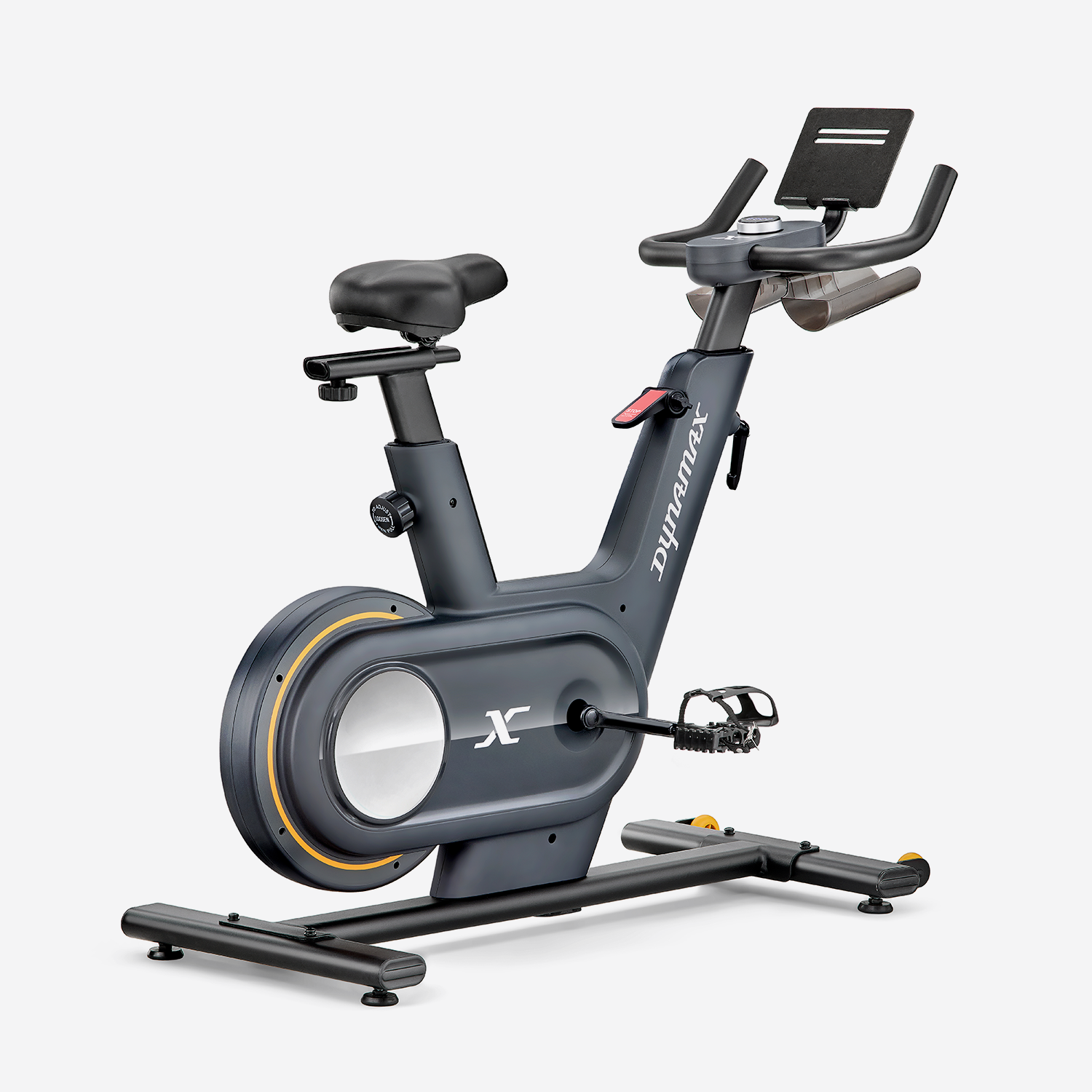
The Dynamax Sprint Bike is fully compatible with QZ and can become the centre of a much more flexible indoor-training setup. The bike remains the starting point, while QZ connects it to the training apps you prefer, displays live workout data and provides a virtual Bluetooth bike for your connected-training ecosystem.[3] [7]

Table of Contents
Dynamax Sprint Bike: a complete indoor-cycling foundation
The Sprint Bike is designed for both endurance rides and intense intervals. The official specification lists an 8 kg flywheel, 12 pre-set programmes and 32 levels of electronic resistance, so the intensity can match different goals, from steady endurance work to climbs and sprints.[1]
- 32-level electronic resistance, adjustable from the console and ready to be part of a connected-training workflow.
- Live console data: speed, time, distance, calories and RPM/cadence.
- Wireless heart-rate receiver compatible with Bluetooth 4.0 heart-rate monitors; the monitor is not included.
- Built-in tablet holder, useful for routes, classes and training dashboards.
- 8 kg / 18 lb flywheel for a smooth and quiet ride.
- Dual-adjustable padded saddle and easily adjustable soft-touch handlebars.
- Self-levelling pedals with adjustable straps and integrated bottle holders.
- Maximum user weight listed as 110 kg, transport wheels, floor-level adjusters and straightforward assembly.

Every feature the Sprint Bike can have with QZ
QZ acts as a bridge between fitness equipment and training apps: it connects bikes, treadmills, ellipticals and rowers, collects the available metrics and makes them usable in the training setup you prefer.[3] With the DYNAMAX Bluetooth profile configured as an FTMS Bike, the Sprint Bike enters QZ’s FTMS-bike workflow.[7] [6]
| QZ feature | What it adds to the Dynamax Sprint Bike |
|---|---|
| FTMS connection | Recognition of the device as an FTMS bike through the DYNAMAX Bluetooth name and a direct connection to QZ. |
| Real-time metrics | A QZ dashboard with speed, RPM/cadence, distance, calories and other available FTMS values; power is shown when supplied by the source or calculated by QZ according to the selected configuration. |
| Manual and automatic resistance | QZ can pass compatible resistance commands through the FTMS workflow, allowing the bike’s electronic levels to follow manual commands, routes and workouts. |
| Virtual Bluetooth bike | QZ exposes a virtual bike that can be discovered by the training app on a second device. |
| Two-device training | QZ can stay on the phone beside the bike while Zwift, MyWhoosh, ROUVY, Kinomap or another app runs on a tablet, PC or second phone. |
| Heart rate | A Bluetooth heart-rate monitor can be included in the QZ workflow; when an app does not read the FTMS heart-rate profile directly, QZ can provide the virtual heart-rate service required by the setup. |
| Workouts and targets | QZ supports training programmes, power targets and resistance adjustments where the app and bike profiles allow them. |
| Workout saving and sharing | Sessions can be recorded and synchronised with services such as Strava, Garmin Connect, Apple Health/HealthKit and Google Health/Health Connect when configured.[3] [5] |
| Advanced controls | QZ provides settings for resistance gain and offset, allowing the bike’s behaviour to be adapted to the rider’s preferred training style. |
Which apps can you use?
The Sprint Bike is listed by the manufacturer and retailer as compatible with Kinomap and Zwift. With QZ’s FTMS connection, the possibilities become broader: QZ documentation includes Zwift, BKOOL and Fulgaz among apps that read an FTMS signal, while the virtual-bike workflow can also bring the data to MyWhoosh and ROUVY.[1] [2] [4] [5]
- Zwift: virtual-bike connection, cadence and workout data, with resistance following compatible route or workout commands.
- Kinomap: real-world routes, videos and personalised programmes, with compatibility already listed for the Sprint Bike.
- MyWhoosh and ROUVY: run the app on a second device while QZ maintains the connection to the bike.
- BKOOL and Fulgaz: FTMS applications documented in the QZ workflow.
- Peloton and other apps: QZ can provide the data and heart-rate bridge according to the app profile and the Bluetooth services required by the setup.

How to set it up with QZ
- Install QZ on the phone or tablet that will stay near the Dynamax Sprint Bike.
- Open the bike settings in QZ and select the FTMS Bike path; if needed, enter the exact Bluetooth name
DYNAMAX. - Connect the Sprint Bike to QZ and confirm that the console’s live values are arriving in the QZ dashboard.
- Keep QZ’s virtual Bluetooth bike output enabled.
- Open Zwift, Kinomap, MyWhoosh, ROUVY, BKOOL, Fulgaz or your chosen app on a second device and search for the QZ virtual bike.
- For resistance-controlled workouts, keep resistance control enabled in QZ and select a compatible route or programme.
- To include heart rate, connect a Bluetooth heart-rate monitor and enable the relevant service in the setup.
The result: a much more versatile Sprint Bike
The Dynamax Sprint Bike keeps its smooth ride, electronic resistance and essential console data, while QZ turns it into part of an open connected-training environment. You can use the screen you prefer, choose the app that best fits your workout, control resistance through the compatible workflow and save your results to the services you already use.
Dynamax Sprint Bike → QZ → virtual Bluetooth bike → training app: a straightforward connection that turns a capable home exercise bike into a complete indoor-cycling platform.
Visit the official Dynamax Sprint Bike page, explore QZ Fitness and read the public QZ documentation for supported applications.
Sources
- Dynamax Fitness – Sprint Bike: specifications, features, console data, heart-rate receiver and official images.
- Argos – Dynamax Sprint Exercise Bike: listed Zwift and Kinomap compatibility and product specifications.
- QZ Fitness – official website: connecting equipment to apps and synchronising workouts.
- QZ – supported applications: FTMS applications and resistance control.
- QZ – public FAQ: Garmin integration, Kinomap compatibility and app bridging.
- QZ – FTMS Bike driver: FTMS bike handling, power and resistance commands.
- QZ – Bluetooth detection: the public code path that recognises DYNAMAX devices.